Part 2 — Shipping journald to VictoriaLogs (No Agents Required)
Part 2 of the Homelab Telemetry series. Part 1 is the overview; Now the very first step of every app. Gather the data
Where this sits in the series:
- Part 1 — Overview: the whole pipeline, decision by decision.
- Part 2 — Logs: journald → VictoriaLogs, zero agents on the laptops. (in this post)
- Part 3 — A local LLM triages the logs on a four-core Celeron.
- Part 4 — Notifications: ntfy, and the two rabbit holes that ate an evening.
The main idea depends on the collection of the logs in a centralized place. Something like Elasticsearch, I had in mind, but lighter and pure open source.
Why not Loki + Grafana
Despite google brings Loki up a lot, when I came across VictoriaLogs I found enough to
satisfy my curiocity and want to try this out. Nothing against them nevertherless, and
actually could do the work as well. But for my scope the Loki stack is three moving parts:
Loki (store), Grafana (a second app whose entire job is to look at the first one),
and a shipper on every laptop. btw Loki also isn’t in the TrueNAS catalog, so it’s a
custom-YAML deploy anyway, however the same holds for the VictoriaLogs
VictoriaLogs collapses that to one part:
Some things which attracked me to the VictoriaLogs are that is a single Go binary, no JVM, something
kind important as I go and realize how weak is my box after all. Good for the basic server but…
Then it has its own web UI at /select/vmui/, so no Grafana; provides a real query ladnguage (LogsQL) with an HTTP API my triage script can hit; and the clincher: it ingests systemd-journal-upload natively at /insert/journald (something I didnt know at the moment).
Deploying VictoriaLogs on TrueNAS
As said, you wont find it in the catalog. not sure why but this is another first time experience to find out how to install containers to the Nas
First create another dataset, dedicated to the logs
A dataset at /mnt/datalab/victorialogs, chown -R 568:568, and the UI comes up
at http://<nas>:9428/select/vmui/. Retention is one flag; 14 days is plenty for
“what happened last Tuesday.”
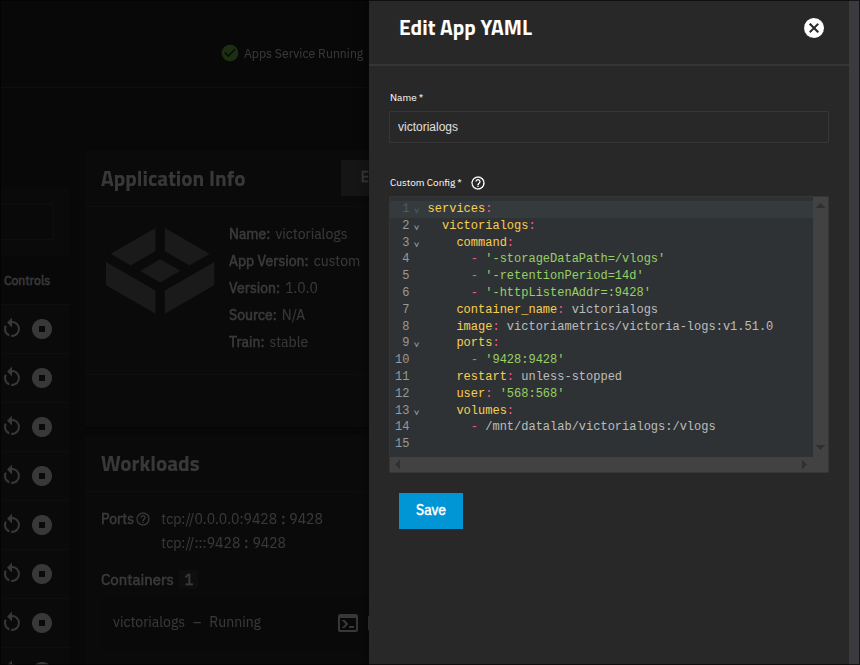
→ Apps → Discover → Install via YAML:
services:
  victorialogs:
    image: victoriametrics/victoria-logs:v1.51.0
    container_name: victorialogs
    restart: unless-stopped
    user: "568:568"                     # TrueNAS apps user
    ports:
      - "9428:9428"
    command:
      - "-storageDataPath=/vlogs"
      - "-retentionPeriod=14d"
      - "-httpListenAddr=:9428"
    volumes:
      - /mnt/datalab/victorialogs:/vlogs
The laptops ship logs with… nothing extra
to be brief to the rest part, you will find systemd-journal-upload in the systemd,
A perfect solution which streams the journal over HTTP to a remote endpoint. On openSUSE it’s in the
systemd-journal-remote package. Point it at VictoriaLogs with a drop-in:
# /etc/systemd/journal-upload.conf.d/vlogs.conf
[Upload]
URL=http://192.168.1.12:9428/insert/journald
sudo zypper install systemd-journal-remote
sudo systemctl enable --now systemd-journal-upload.service
That’s it. No Alloy, no Vector, no Promtail. The “agent” was in the box the whole
time. VictoriaLogs parses the journald fields and keeps their names (_msg,
PRIORITY, _SYSTEMD_UNIT, _HOSTNAME, SYSLOG_IDENTIFIER), so you can filter
on exactly what you’d expect.
Verify it’s flowing:
curl http://192.168.1.12:9428/select/logsql/query \
  --data-urlencode 'query=_time:5m' -d 'limit=5'
On NixOS it’s even tidier — one option, no package hunting (NixOS ≥ 25.05):
services.journald.upload = {
  enable = true;
  settings.Upload.URL = "http://192.168.1.12:9428/insert/journald";
};